Install the uv toolchain and use it to manage CPython 3.14 interpreters
Create a new Python project with uv init and recognize the generated source layout
Pin a project to a specific Python interpreter using .python-version
Launch the modern REPL and execute Python statements interactively
Run a minimal module inside a uv-managed environment using uv run
Identify the Personal Knowledge Tracker CLI as the sample application that will evolve throughout this book
Prerequisites
No additional prerequisites beyond those listed in About This Book.
Concept Overview
Python 3.14 is the current general-availability release of CPython, the reference implementation of Python written in C. A reference implementation is the standard version that defines how the language behaves. Most developers run CPython in production.
Two interpreter binaries ship with the release. The standard build is python3.14. It retains the Global Interpreter Lock (GIL), a mutex that allows only one thread to execute Python bytecode at a time. The second build is python3.14t, an officially supported free-threaded interpreter that removes the GIL. Free-threaded means multiple threads can run Python bytecode truly in parallel. The free-threaded build is opt-in only.
Start with the standard build. Only switch if you have a specific CPU-bound threading workload, meaning tasks that spend most of their time computing rather than waiting for external I/O.
For project management, modern Python relies on uv. Astral's uv binary replaces pip, pip-tools, pipenv, poetry, pyenv, and virtualenv. It installs interpreters, creates virtual environments, resolves dependencies, and runs commands. This book uses uv for every project task.
The Personal Knowledge Tracker CLI is this book's running sample application. It is a local-first command-line tool for capturing, organizing, and searching short knowledge notes. Over the next twelve chapters it will grow from a single file into a tested, typed, async-capable package. In this chapter you will scaffold the project and write its first lines of code.
Step-by-Step Implementation
Step 1: Install uv
Install the uv binary using the official installer in your terminal, the command-line interface where you type shell commands.
The installer places uv in a directory that is typically on your PATH. PATH is an environment variable that tells your shell where to find executable programs. After installation, verify that uv is available.
uv --version
If uv --version prints an error instead of a version number, close and reopen your terminal so the shell reloads its environment, or manually add the uv binary directory to your PATH. Once the command succeeds, the toolchain is ready.
Step 2: Install CPython 3.14
uv can download and manage Python interpreters itself. Install CPython 3.14 now; this places the interpreter in uv's managed cache without modifying your system Python.
uv python install 3.14
Verify the installation by listing available interpreters.
uv python list
You should see an entry for 3.14.0 or a later patch release. Seeing the version in this list confirms that uv can provision the interpreter on demand.
Step 3: Create the Personal Knowledge Tracker Project
Create a new project directory and initialize it with uv init. The command generates a pyproject.toml, a .python-version pin, and a src/ tree. If the generated .python-version does not already contain 3.14, overwrite it with the following command.
uv init knowledge-tracker
cd knowledge-tracker
echo "3.14" > .python-version
The generated pyproject.toml looks like this (excerpt):
[project]
name = "knowledge-tracker"
version = "0.1.0"
description = "A new Python project."
requires-python = ">=3.14"
If uv init detected a different default interpreter and produced a lower requires-python value, edit the file so it matches the excerpt above. The .python-version file contains a single line, 3.14. Every uv run or uv sync command in this directory will select the latest patch release of that Python version. Pinning prevents the "works on my machine" problem.
Step 4: Understand the Source Layout
uv init creates a source layout by default. A source layout places the package code, the importable Python code for your application, under src/knowledge_tracker/ rather than at the repository root, the top-level directory of your project. An installed package is what users import after installation. Flat layout, where code lives directly at the project root, is a legacy pattern.
Source layout is the correct default for every new Python project. It prevents accidental imports from the repository root and ensures that test code imports the installed package exactly as users will. Last year I migrated a flat-layout project to src/ and watched an entire category of CI import failures vanish overnight. Treat flat layout as a legacy pattern. The uv.lock lockfile will appear once you add dependencies and run uv sync; it is not present yet because the project has no external packages.
Step 5: Add a Minimal Entry Point
You will now add three things: a function that returns text, a function that runs the program, and an execution guard that prevents accidental invocation on import. The -> str and -> None symbols are type hints; they document that a function returns a string or returns nothing. Python ignores these at runtime, but they help readers and tools understand the code.
Open src/knowledge_tracker/__init__.py. Replace its contents with a small greeting function and a main entry point.
def greet() -> str:
    return "Hello from the Personal Knowledge Tracker."

def main() -> None:
    message = greet()
    print(message)
The greet function returns a str. The main function coordinates the program; it calls greet, captures the result, and prints it. The if __name__ == "__main__" guard ensures main runs only when the file is executed directly, not when it is imported as a module. The -m flag tells Python to run a module as a script. For uv run python -m knowledge_tracker to find an entry point, the package needs a __main__.py file that imports and calls main().
Create src/knowledge_tracker/__main__.py with the following content.
from knowledge_tracker import main

if __name__ == "__main__":
    main()
This separation keeps executable behavior in __main__.py while leaving __init__.py clean for imports.
Step 6: Run the Application
A virtual environment is an isolated Python installation with its own packages. Execute the module through uv run. This command selects the interpreter pinned in .python-version, creates the virtual environment if it does not yet exist, and runs your code.
uv run python -m knowledge_tracker
You should see:
Hello from the Personal Knowledge Tracker.
If you see a ModuleNotFoundError, check that you are inside the knowledge-tracker directory and that .python-version is present. Running the module through uv confirms that the source layout is wired correctly and the package is importable.
Step 7: Explore the REPL
Python's interactive REPL is a first-class tool. Launch it with uv run python.
uv run python
At the >>> prompt, inspect the running interpreter. The sys module provides system-specific parameters and functions.
The sys.version_info tuple confirms you are running Python 3.14. The sys._is_gil_enabled() function returns True because the standard build is active. The REPL supports syntax highlighting and multiline editing. Use it to experiment before committing code to a file.
Exit the REPL with Ctrl+D on Linux or macOS, or Ctrl+Z followed by Enter on Windows.
Full Example
Here is the complete state of the package after the steps above.
src/knowledge_tracker/__init__.py:
def greet() -> str:
    return "Hello from the Personal Knowledge Tracker."

def main() -> None:
    message = greet()
    print(message)
src/knowledge_tracker/__main__.py:
from knowledge_tracker import main

if __name__ == "__main__":
    main()
To run it, ensure your working directory is the project root and execute:
uv run python -m knowledge_tracker
The project structure should now match the source layout convention:
This skeleton is small, but it is the foundation for every chapter that follows. The greet function will evolve into note creation logic, and main will become the CLI dispatcher. The src/ tree will expand into models, storage, commands, and cli modules. The uv.lock file will appear once you add external dependencies and run uv sync. Start simple; grow deliberately.
Common Mistakes
Mixing system Python with uv-managed interpreters. Installing Python through apt, brew, or Windows Store alongside uv python install creates confusion about which binary is active. Pick one source per machine; uv is the modern default.
Forgetting the `.python-version` pin. Without this file, uv run selects a different interpreter on a teammate's machine. Always commit .python-version to version control.
Adding code at the project root instead of under `src/`. Files placed next to pyproject.toml are not part of the installed package. Keep all application code inside src/knowledge_tracker/.
Using `pip install` inside a uv project.uv manages its own virtual environment. Use uv add <package> to declare dependencies and uv run to execute commands. Don't activate virtual environments manually.
Omitting the `if __name__ == "__main__"` guard. Without it, importing the module as a library triggers main() immediately. The guard separates executable behavior from importable behavior.
Performance and Production Considerations
uv resolves dependencies an order of magnitude faster than pip. For local development, this means installing packages in milliseconds rather than seconds. For CI pipelines, it means faster job startup and lower compute costs. Standardize on uv for every new project.
The standard python3.14 build remains the correct choice for production services. The free-threaded python3.14t build is available for CPU-bound multithreading. It is somewhat slower per thread than the standard build but can scale work across multiple cores. Do not switch to the free-threaded build unless profiling proves the GIL is your bottleneck.
Source layout prevents import bugs that flat layout encourages. When tests run against an installed package rather than repository root files, they validate the same import paths that production uses. Adopt source layout from day one; retrofitting it later is tedious.
Commit both pyproject.toml and .python-version to version control. Once uv generates a uv.lock file, commit it as well. These files are the minimum needed for another developer to reproduce your environment exactly.
Summary
You installed uv, used it to install CPython 3.14, and created the Personal Knowledge Tracker project. You pinned the interpreter with .python-version, explored the REPL, and ran a minimal module via uv run. The source layout convention is now in place.
The Personal Knowledge Tracker CLI will grow from this foundation, gaining new language features, refactors, and tooling in each subsequent chapter. Keep this project directory open; you'll return to it in Chapter 2.
Key Terms
CPython: the reference implementation of Python, written in C. The python3.14 binary runs this interpreter.
uv: Astral's project management tool. It installs interpreters, creates projects, resolves dependencies, and runs commands in a single binary.
Source layout: the project structure that places package code under src/<package>/ rather than at the repository root. This prevents accidental local imports and ensures tests exercise the installed package.
`.python-version`: a text file that tells uv which Python interpreter version to use for a project. uv reads this file automatically.
REPL: Read-Eval-Print Loop. The interactive Python shell launched with uv run python that supports syntax highlighting and multiline editing.
GIL: Global Interpreter Lock. A mutex in CPython that allows only one thread to execute Python bytecode at a time. The standard python3.14 build retains it.
Free-threaded Python: the python3.14t build of CPython that removes the GIL. It is opt-in and officially supported as of 3.14.
`if __name__ == "__main__"`: a module-level guard that executes code only when a file is run directly, not when it is imported.
Mini Quiz
A colleague asks you to add the httpx library to the Personal Knowledge Tracker project. Which command is correct?
A. pip install httpx
B. uv init httpx
C. uv run httpx
D. uv add httpx
The project stores its code under src/knowledge_tracker/ instead of at the repository root. What is the main benefit of this source layout?
A. It allows the code to run without a virtual environment.
B. It eliminates the need for __init__.py files.
C. It makes the package importable only on Python 3.14.
D. It prevents accidental imports from the repository root and ensures tests use the installed package.
In src/knowledge_tracker/__init__.py, the main function is wrapped in if __name__ == "__main__": main(). What happens if you remove this guard and import the module from another file?
A. The import statement fails with a syntax error.
B. Python automatically renames __name__ to "__main__".
C. The module becomes impossible to test.
D. main() executes immediately during the import.
After profiling, you confirm the GIL is the bottleneck on a CPU-bound multithreading workload. Which interpreter build should you deploy?
A. The python3.14t free-threaded build
B. The standard python3.14 build
C. The system Python installed by the OS package manager
D. The REPL interactive shell
A new teammate clones the Personal Knowledge Tracker repository, but uv run python selects Python 3.13 instead of 3.14. Which file is most likely missing or incorrect?
A. pyproject.toml
B. uv.lock
C. .python-version
D. src/knowledge_tracker/__init__.py
You open the REPL and run import sys; print(sys._is_gil_enabled()). The output is True. What does this indicate?
A. The interpreter is running with the Global Interpreter Lock active.
B. The interpreter is in free-threaded mode.
C. The project has a syntax error in pyproject.toml.
D. The virtual environment is corrupted.
Answers are provided in the Answer Key at the end of the book.
Activity
Open your Personal Knowledge Tracker project directory.
Create a new file at src/knowledge_tracker/repl_demo.py.
Define a function get_python_version() that returns the string "3.14".
Define a main() function that calls get_python_version(), assigns the result to a variable named version, and prints it with print("Tracker running on Python", version).
Add the if __name__ == "__main__" guard so main() runs only when the file is executed directly.
Run the file with uv run python -m knowledge_tracker.repl_demo and verify the output.
Launch the REPL with uv run python, then type the following import and call:
>>> from knowledge_tracker.repl_demo import get_python_version
>>> get_python_version()
'3.14'
You'll confirm that importing the module does not trigger the print statement from main().
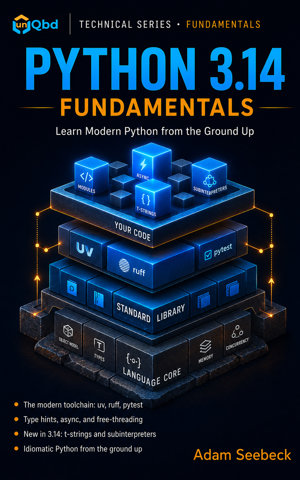
Learn Python the way it is actually written in 2026. Python 3.14 Fundamentals teaches the language from first principles and pairs it with the modern toolchain professional teams use, so you finish with idiomatic, type-checked, tested code instead of outdated tutorial habits.
This book is built for engineers. If you already ship in another language and need a working command of modern Python, or you learned Python years ago and want to catch up to the current toolchain and the new 3.14 features, you start at the foundation and build up one chapter at a time. Across twelve chapters you grow a single real project, a Personal Knowledge Tracker command-line app, from an empty folder to a packaged, tested, lint-clean tool.
What you build and learn: - A uv-managed project on Python 3.14 with a clean src layout, a pinned interpreter, and a reproducible lockfile - Values, expressions, control flow, functions, and scope, with type hints on every signature - Collections, comprehensions, generators, and the iterator protocol - Files, paths, and I/O with pathlib, JSON, CSV, and Zstandard compression from the standard library - Modules, packages, and project structure, plus adding dependencies the modern way with uv - Classes, dataclasses, and Protocols for structural typing - Error handling with custom exceptions, ExceptionGroup, and logging - Async and concurrency: asyncio, TaskGroup, threads, multiprocessing, and the new free-threaded build - Testing with pytest, type checking with mypy, and linting and formatting with ruff - A capstone that ties the whole toolchain together into one shippable project
What is new in Python 3.14, woven in where it fits: - Template strings (t-strings) for safe, structured text - Deferred annotation evaluation and the annotationlib module - Free-threaded Python for true multi-core parallelism - Subinterpreters for isolated in-process execution - Bracketless except and the compression.zstd module
Built to learn from, not just read: every chapter ends with a mini quiz to check your understanding, a hands-on activity, and a runnable project step. All code is type-hinted, pytest-tested, and ruff-clean, so you practice the habits that make Python projects ship.
Prerequisites: general programming experience in any language. No prior Python required. You install Python 3.14 and the modern toolchain in the first chapter.
Modern Python, from the ground up. Twelve chapters. One real project. Build it for keeps.
Release DateMay 22, 2026
GenreSoftware & AI Development
ISBN979-8-90377-047-2
Read and listen on the go with the unQbd app.Get the app