Contrast runtime governance controls with static analysis, framework hardening, and network perimeter defenses
Identify the five runtime governance packages in the toolkit and their distinct security responsibilities
Map each OWASP Agentic AI Top 10 risk to the correct defense layer (runtime, framework, identity, data, or human process)
Configure a Visual Studio Code workspace with the Python and C# Dev Kit extensions for dual-framework agent development
Execute minimal baseline agents in both Python and .NET to validate the lab environment
Prerequisites
No additional prerequisites beyond those listed in About This Book.
Concept Overview
Autonomous agents execute in loops, receiving input, reasoning, invoking tools, and emitting output. Each iteration expands the attack surface. Intent breaking and goal manipulation hijacks reasoning. Tool misuse exfiltrates data, and output manipulation leaks secrets or spreads misinformation.
Static analysis, network perimeters, and API gateways sit outside these loops. They cannot observe the semantic content of a live tool call or block a dynamic intent breaking and goal manipulation.
No static analysis tool can stop a live intent breaking and goal manipulation attack.
Framework-level controls (system prompt hardening, model alignment, and SDK sandboxing) reduce risk at the foundation. Telemetry and tracing provide observability after the fact. Proxies and wrappers add mediation, but they often lack context about agent state and intent. Runtime governance fills the gap between these layers.
It attaches bounded interception hooks at specific decision points inside the execution loop: input validation before model inference, policy checks before tool execution, and output filtering before delivery to the user or downstream system.
Governance belongs inside the loop.
The Microsoft Agent Governance Toolkit ships seven open-source packages, five of which apply to bounded interception inside the agent loop:
agentmesh-marketplace (plugin lifecycle and signing; covered in Appendix C)
agentmesh-lightning (RL training governance; covered in Appendix C)
Not every control belongs inside the agent loop.
The OWASP Agentic AI Top 10 defines ten distinct risks. Misaligned and deceptive behaviors (T7) require model alignment work and red-team testing at the framework layer. Memory poisoning (T1) demands integrity controls on the data layer that backs agent memory. Cascading hallucination attacks (T5) call for human review pipelines across multi-agent flows, while overwhelming human-in-the-loop (T10) requires escalation throttling and queue management outside the agent loop. The remaining six risks manifest primarily during execution: intent breaking and goal manipulation (T6), repudiation and untraceability (T8), tool misuse (T2), privilege compromise (T3), identity spoofing and impersonation (T9), and resource overload (T4). This book maps each runtime risk to its enforcement package.
Runtime governance cannot fix a misalignment breach.
I once audited a team that mapped T1 to agent-os-kernel and assumed they were done. Two weeks of policy tuning could never catch a poisoned memory write; T1 lives in the data layer, outside any runtime evaluator.
You will build a single reference application across two frameworks. The Python implementation uses the OpenAI Agents SDK, while the .NET implementation uses the Microsoft Agent Framework. Both versions implement the same TravelSupportAgent domain model: a travel support assistant that handles booking inquiries, itinerary modifications, cancellation requests, and flight status lookups. The agent receives natural language queries, reasons over travel policy context, and returns structured responses. Later chapters attach governance hooks to this boundary so you can compare runtime security patterns across stacks.
Marketplace and Lightning sit outside the runtime governance loop, so this book covers them at a high level in Appendix C and focuses the chapters ahead on the five interception packages above.
Step-by-Step Implementation
Step 1: Scaffold the Python Project and Install Dependencies
Create a directory for the Python baseline and open the folder in Visual Studio Code. Install the Python extension from the Extensions view. Open the integrated terminal and create a virtual environment.
This gives you the baseline SDK and the governance packages you will use throughout the book.
Step 2: Define the Python Baseline Agent
Define the TravelSupportAgent class. It wraps the OpenAI Agents SDK Agent and Runner types. Keeping the agent behind a custom class lets you attach governance hooks later without changing consumer code.
Python:
from agents import Agent, Runner

class TravelSupportAgent:
    def __init__(self, model_name: str = "gpt-4o-mini") -> None:
        self.agent = Agent(
            name="TravelSupportAgent",
            instructions="You are a travel support assistant. Help users with bookings and itinerary changes.",
            model=model_name
        )

    async def run(self, user_query: str) -> str:
        result = await Runner.run(self.agent, user_query)
        return result.final_output
The class exposes a single async entry point, run, which accepts a user query and returns the model's final output. This boundary is where runtime governance will eventually attach.
Step 3: Define the Python Execution Entry Point
Add an async runner function so you can execute the agent from the command line. Place this code in the same travel_agent.py file below the TravelSupportAgent class.
Python:
import asyncio

async def execute_travel_query(query: str) -> None:
    agent = TravelSupportAgent()
    response = await agent.run(query)
    print(response)

if __name__ == "__main__":
    asyncio.run(execute_travel_query("What is the cancellation policy for flight AA123?"))
Run the script from the VS Code integrated terminal to confirm the environment is functional:
python travel_agent.py
You should see a generated response in the terminal. If you receive an authentication error, verify that your OPENAI_API_KEY environment variable is set in the terminal session.
Step 4: Scaffold the .NET Project and Install Dependencies
Start a separate directory for the .NET baseline and open the folder in VS Code. Install the C# Dev Kit extension. Open the integrated terminal and create a new console project:
dotnet new console -n TravelAgentBaseline
cd TravelAgentBaseline
Add the Microsoft Agent Framework and the Microsoft Agent Governance SDK:
The Microsoft.AgentGovernance package ships the full SDK and exposes the policy, identity, runtime, sandbox, audit, and mesh APIs through Microsoft.AgentGovernance.* sub-namespaces. Your .csproj file should now contain package references for Microsoft.AgentFramework and Microsoft.AgentGovernance with Version="1.0.0-preview".
Run a build to restore packages and verify the toolchain:
dotnet build
Step 5: Define the .NET Configuration Type
Centralize agent settings in a record so you can inject them later without scattering magic strings.
.NET:
public record AgentConfiguration(
    string ModelName = "gpt-4o-mini",
    string AgentName = "TravelSupportAgent"
);
AgentConfiguration acts as the single source of truth for model and agent identity parameters.
Step 6: Define the .NET Baseline Agent
Implement the TravelSupportAgent class using the Microsoft Agent Framework. The shape mirrors the Python version so cross-framework comparisons remain direct.
.NET:
using System.Threading;
using System.Threading.Tasks;
using Microsoft.AgentFramework;

public class TravelSupportAgent
{
    private readonly AgentConfiguration _config;
    private readonly Agent _agent;

    public TravelSupportAgent(AgentConfiguration config)
    {
        _config = config;
        _agent = new Agent(
            name: config.AgentName,
            instructions: "You are a travel support assistant. Help users with bookings and itinerary changes.",
            model: config.ModelName
        );
    }

    public async Task<string> RunAsync(string userQuery, CancellationToken cancellationToken = default)
    {
        var result = await _agent.RunAsync(userQuery, cancellationToken);
        return result.FinalOutput;
    }
}
The RunAsync method is the interception boundary. Later chapters will wrap this call with policy evaluation and audit logging.
Step 7: Define the .NET Execution Entry Point
Wire the agent into a console host. For the baseline, place AgentConfiguration, TravelSupportAgent, and the Program class in Program.cs inside the TravelAgentBaseline project directory. Replace the default top-level statements generated by the template.
.NET:
using System;
using System.Threading.Tasks;

public class Program
{
    public static async Task Main(string[] args)
    {
        var config = new AgentConfiguration();
        var agent = new TravelSupportAgent(config);
        var response = await agent.RunAsync("What is the cancellation policy for flight AA123?");
        Console.WriteLine(response);
    }
}
Run the application from the integrated terminal:
dotnet run
Both baselines now execute the same domain query. The next steps map where governance controls belong.
Step 8: Define the OWASP Mapping in Python
Build a read-only data structure that maps each OWASP Agentic AI Top 10 risk to its primary defense layer and the toolkit package that owns runtime enforcement. These primary mappings show where runtime enforcement originates. Secondary controls also apply; Audit provides detective coverage for disclosure risks, and framework-level prompt isolation complements runtime execution rings.
The frozen=True decorator prevents accidental mutation. Treat this mapping as compiled metadata, not runtime configuration.
Step 9: Define the OWASP Mapping in .NET
Mirror the mapping in .NET using immutable records and a static class.
.NET:
using System.Collections.Generic;

public record OwaspControlMapping(
    string RiskId,
    string RiskName,
    string PrimaryDefenseLayer,
    string ToolkitPackage
);

public static class OwaspToolkitMap
{
    public static readonly IReadOnlyList<OwaspControlMapping> Mappings = new List<OwaspControlMapping>
    {
        new("T1", "Memory Poisoning", "data", "N/A"),
        new("T2", "Tool Misuse", "runtime", "Microsoft.AgentGovernance.Policies"),
        new("T3", "Privilege Compromise", "runtime", "Microsoft.AgentGovernance.Runtime"),
        new("T4", "Resource Overload", "runtime", "Microsoft.AgentGovernance.Runtime"),
        new("T5", "Cascading Hallucination Attacks", "human process", "N/A"),
        new("T6", "Intent Breaking and Goal Manipulation", "runtime", "Microsoft.AgentGovernance.Policies"),
        new("T7", "Misaligned and Deceptive Behaviors", "framework", "N/A"),
        new("T8", "Repudiation and Untraceability", "runtime", "Microsoft.AgentGovernance.Audit"),
        new("T9", "Identity Spoofing and Impersonation", "identity", "Microsoft.AgentGovernance.Identity"),
        new("T10", "Overwhelming Human-in-the-Loop", "human process", "N/A")
    };
}
Notice that six of the ten risks map to toolkit packages at runtime. The remainder require framework, infrastructure, or human-process controls. Mapping them incorrectly creates false confidence.
Full Example
The following files consolidate the scaffolding, baseline agents, and OWASP mapping into self-contained projects. Copy them into the directories you created in the preceding steps.
using System;
using System.Collections.Generic;
using System.Threading;
using System.Threading.Tasks;
using Microsoft.AgentFramework;

public record AgentConfiguration(
    string ModelName = "gpt-4o-mini",
    string AgentName = "TravelSupportAgent"
);

public class TravelSupportAgent
{
    private readonly AgentConfiguration _config;
    private readonly Agent _agent;

    public TravelSupportAgent(AgentConfiguration config)
    {
        _config = config;
        _agent = new Agent(
            name: config.AgentName,
            instructions: "You are a travel support assistant. Help users with bookings and itinerary changes.",
            model: config.ModelName
        );
    }

    public async Task<string> RunAsync(string userQuery, CancellationToken cancellationToken = default)
    {
        var result = await _agent.RunAsync(userQuery, cancellationToken);
        return result.FinalOutput;
    }
}

public record OwaspControlMapping(
    string RiskId,
    string RiskName,
    string PrimaryDefenseLayer,
    string ToolkitPackage
);

public static class OwaspToolkitMap
{
    public static readonly IReadOnlyList<OwaspControlMapping> Mappings = new List<OwaspControlMapping>
    {
        new("T1", "Memory Poisoning", "data", "N/A"),
        new("T2", "Tool Misuse", "runtime", "Microsoft.AgentGovernance.Policies"),
        new("T3", "Privilege Compromise", "runtime", "Microsoft.AgentGovernance.Runtime"),
        new("T4", "Resource Overload", "runtime", "Microsoft.AgentGovernance.Runtime"),
        new("T5", "Cascading Hallucination Attacks", "human process", "N/A"),
        new("T6", "Intent Breaking and Goal Manipulation", "runtime", "Microsoft.AgentGovernance.Policies"),
        new("T7", "Misaligned and Deceptive Behaviors", "framework", "N/A"),
        new("T8", "Repudiation and Untraceability", "runtime", "Microsoft.AgentGovernance.Audit"),
        new("T9", "Identity Spoofing and Impersonation", "identity", "Microsoft.AgentGovernance.Identity"),
        new("T10", "Overwhelming Human-in-the-Loop", "human process", "N/A")
    };
}

public class Program
{
    public static async Task Main(string[] args)
    {
        var config = new AgentConfiguration();
        var agent = new TravelSupportAgent(config);
        var response = await agent.RunAsync("What is the cancellation policy for flight AA123?");
        Console.WriteLine(response);
    }
}
The Python implementation provides the agent wrapper, execution entry point, and OWASP mapping in a single module. The .NET implementation centralizes agent settings in AgentConfiguration and places all types in Program.cs for the baseline. Both execute the same TravelSupportAgent domain logic and share an immutable OWASP control mapping. This symmetry attaches governance controls to identical logical points in each stack.
Common Mistakes
Treating static analysis as sufficient. SAST tools scan source code. They cannot observe a live intent breaking and goal manipulation or a dynamic tool call. Use static analysis for code quality; use runtime governance for execution safety.
Assuming an API gateway provides agent security. An API gateway cannot inspect a tool call. Gateways inspect TLS termination, headers, and rate limits. They are blind to the semantic content inside an agent loop. Do not rely on perimeter defenses to stop tool misuse or output exfiltration.
Installing all seven toolkit packages indiscriminately. Each package adds dependencies and attack surface. Only install the packages that match your threat model. If you are not running multi-agent delegation, omit Mesh until you need it.
Mapping every OWASP risk to the toolkit runtime. Supply chain risks require dependency scanning and signed artifacts. Misinformation requires human review pipelines. Assigning these to runtime governance creates false confidence and wastes engineering effort.
Skipping the baseline agent validation. If the ungoverned agent cannot execute a basic query reliably, adding policy enforcement will only obscure underlying framework or configuration errors. Verify the baseline first.
Performance and Production Considerations
The baseline agents in this chapter carry no policy overhead. That is intentional; you cannot measure the cost of governance without a working baseline. Once you add agent-os-kernel and agentmesh-runtime, measure latency overhead empirically. Local policy evaluation adds CPU and memory pressure relative to policy complexity. Remote policy services add network round-trips.
Do not deploy these baseline agents to production. They lack input validation, output filtering, and audit logging, so treat execute_travel_query and Program.Main as lab utilities only.
Pin preview package versions exactly. Using floating preview versions in production builds introduces non-deterministic behavior. Lock the versions you validated in this chapter.
The Python TravelSupportAgent uses asyncio throughout. Avoid mixing async and synchronous I/O in the same call stack; blocking the event loop stalls the agent runner and any attached governance hooks. The .NET TravelSupportAgent uses Task and CancellationToken. Pass the token through every async boundary so that policy timeouts and sandbox kills can propagate correctly.
Summary
Runtime governance sits inside the agent execution loop. It inspects inputs, tool calls, and outputs at bounded interception hooks while they are in flight. Static analysis, framework hardening, and perimeter security cannot do this.
The Microsoft Agent Governance Toolkit ships seven packages: agent-os-kernel covers policy evaluation and authoring; agentmesh-platform covers identity and cross-agent mesh trust; agentmesh-runtime covers execution rings and worker isolation; agent-sre covers audit and observability; agent-governance-toolkit covers OWASP verification; Marketplace and Lightning are referenced in Appendix C. Six of the ten OWASP Agentic AI Top 10 risks map to runtime governance; the remainder require framework, data, identity, or human-process controls.
You now have a working Visual Studio Code lab with dual baselines. The Python implementation uses the OpenAI Agents SDK, and the .NET implementation uses the Microsoft Agent Framework. Both execute the same TravelSupportAgent domain logic and share an immutable OWASP control mapping. These baselines will carry the governance controls introduced in the chapters ahead.
Key Terms
Runtime governance: Security controls that execute inside the agent decision loop, inspecting inputs, tool calls, and outputs during inference.
Policy evaluation engine: The component that applies declarative rules to agent decisions at runtime.
Execution ring enforcement: A runtime boundary that constrains which tools an agent may invoke based on identity and authorization context.
Tamper-evident evidence: Audit logs that include cryptographic guarantees preventing undetected modification after creation.
Cross-agent trust boundary: The security perimeter between two autonomous agents when one delegates work to another.
Defense layer: The architectural stratum where a control operates, such as runtime, framework, infrastructure, or human process.
Mini Quiz
Your security team asserts that an API gateway with TLS termination and rate limiting fully protects your agent from intent breaking and goal manipulation. Why is this assertion incorrect?
A. API gateways cannot enforce OAuth 2.0 scopes on agent tool calls
B. API gateways require static analysis to function correctly
C. API gateways do not support async request processing
D. API gateways inspect network traffic but cannot see inside the agent execution loop to intercept semantic content
You review the following line from the Python baseline: OwaspControlMapping("T4", "Resource Overload", "runtime", "agentmesh-runtime"). Which conclusion is accurate?
A. The agentmesh-runtime package prevents misalignment attacks at the framework layer
B. Resource overload is addressed at the data layer
C. The agentmesh-runtime package enforces execution-ring limits on agent resources at runtime
D. T4 should be mapped to agent-governance-toolkit for OWASP verification
A colleague proposes using only static analysis to detect live intent breaking and goal manipulation attacks during agent execution. What is the fundamental limitation?
A. Static analysis scans source code before deployment and cannot observe dynamic inputs or tool calls at runtime
B. Static analysis consumes too much memory during inference
C. Static analysis requires the agent-sre package to generate findings
D. Static analysis is incompatible with the OpenAI Agents SDK
In the .NET baseline, OwaspToolkitMap.Mappings is exposed as an IReadOnlyList<OwaspControlMapping>. What is the primary engineering reason for this immutability?
A. To improve serialization performance to JSON
B. To enable lazy loading of the mapping from a remote policy service
C. To satisfy a requirement of the Microsoft Agent Framework
D. To prevent accidental mutation of compiled threat-model metadata at runtime
Your architecture requires Agent Alpha to delegate itinerary changes to Agent Beta across organizational boundaries. Which toolkit package owns the runtime enforcement of that trust boundary?
A. agent-os-kernel
B. agentmesh-runtime
C. agentmesh-platform
D. agent-governance-toolkit
You are prioritizing toolkit packages for a single-agent deployment with no cross-agent communication and no inter-agent trust delegation. Which package can you safely omit today without reducing runtime governance coverage?
A. agentmesh-platform
B. agent-os-kernel
C. agent-sre
D. agentmesh-runtime
Answers are provided in the Answer Key at the end of the book.
Activity
Open the Python project in Visual Studio Code. Create a new module named risk_lookup.py. Import OWASP_TOOLKIT_MAP from your main file. Define a function resolve_package(risk_id: str) -> str that searches the list and returns the toolkit_package for the given risk ID. If the risk maps to infrastructure, framework, or human process layers, return the string "unmapped" instead of raising an exception.
Define a second function runtime_coverage_gap(target_count: int) -> bool that returns True if the number of mappings whose primary_defense_layer equals "runtime" is strictly less than target_count.
Open the integrated terminal, activate the virtual environment, and run a short script that imports risk_lookup, calls resolve_package("T3"), and prints the result of runtime_coverage_gap(7). Verify that the returned package is agentmesh-runtime and that the gap check returns True.
Switch to the .NET project in VS Code. Add a static class RiskLookup with a method static string ResolvePackage(string riskId). Query OwaspToolkitMap.Mappings and return the matching ToolkitPackage. Return "unmapped" when the PrimaryDefenseLayer is not "runtime".
Add a static method static bool RuntimeCoverageGap(int targetCount) that counts mappings where PrimaryDefenseLayer == "runtime" and returns true when the count is below targetCount.
Modify Program.Main to print the resolved package for "T3" and the boolean result for a target of seven. Build and run the application from the integrated terminal using dotnet run. Confirm the output shows Microsoft.AgentGovernance.Runtime and True.
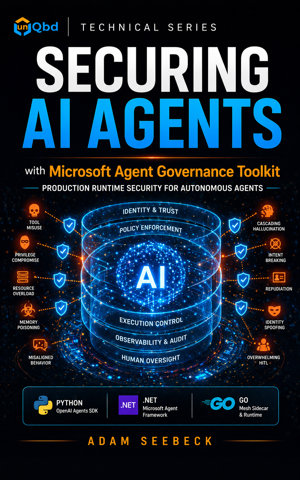
Stop shipping AI agents with no security model. Microsoft released the Agent Governance Toolkit on April 2, 2026, and it's the first toolkit to address every item in the OWASP Agentic AI Top 10 with deterministic, sub-millisecond runtime policy enforcement. This book is how you put it to work.
Most agent security content stops at prompt injection. Real production agents face ten distinct risks: tool misuse, privilege compromise, resource overload, memory poisoning, cascading hallucination, intent breaking, misaligned behavior, repudiation, identity spoofing, and overwhelming the human-in-the-loop. The OWASP Agentic AI Top 10 names them. The Microsoft Agent Governance Toolkit gives you the primitives to enforce them at runtime. This book maps each risk to its correct control layer and builds the enforcement code in production-quality Python, .NET, and Go.
What you will build:
- A trust-boundary model with immutable principal identity, tool identity, and execution context that threads a correlation ID through every governance hook
- Versioned policy rule sets with default-deny, prioritized evaluators, and a local test harness that fails CI on shadowing bugs
- Execution-ring routing that sends low-risk tools through an in-process Rust FFI evaluator and high-risk tools through a process-isolated worker
- A control coverage matrix and gap analyzer that maps the OWASP Agentic AI Top 10 to the right defense layer and flags false confidence
- Cross-framework delegation tokens with Ed25519 signatures, audience binding, expiry, and replay-nonce protection across Python, .NET, and a Go mesh sidecar
- Phase-gated shared memory that prevents a compromised fulfillment agent from reading credentials written during intake
- Immutable audit records with correlation IDs that survive sandbox boundaries and cross-framework handoffs, plus failure classification for runtime exceptions versus policy denials
- Production deployment patterns: per-attachment fail-mode configuration, channel-gated policy promotion, automated rollback, drift detection, and health probes wired to agent-sre
What makes this book different:
- Real OWASP Agentic AI Top 10, not LLM Top 10. Most agent security content recycles the OWASP LLM list. This book maps to the actual Agentic spec published December 2025.
- Cross-framework, not Python-only. A single TravelSupportAgent reference application runs across the OpenAI Agents SDK in Python and the Microsoft Agent Framework in .NET, with a Go mesh sidecar enforcing network-layer policy and a Rust hot-path evaluator under the runtime.
- Production-honest. Process isolation is called process isolation, not full sandboxing. HMAC and shared secrets are explicitly rejected for cross-organizational delegation. Demos versus production are clearly distinguished.
- Real toolkit packages. Every install command, namespace, and API matches the Microsoft Agent Governance Toolkit shipped April 2, 2026: agent-os-kernel, agentmesh-platform, agentmesh-runtime, agent-sre, and agent-governance-toolkit.
Covers the public preview release of the Microsoft Agent Governance Toolkit (April 2026), including the policy evaluation engine, zero-trust identity with decentralized identifiers and the Inter-Agent Trust Protocol, execution rings with worker isolation, audit and SLO observability, and the OWASP verification CLI. Maps directly to the OWASP Agentic AI Top 10 (December 2025).
Prerequisites: Intermediate Python and .NET. Comfort with at least one agent framework (OpenAI Agents SDK, Microsoft Agent Framework, LangGraph, Google ADK, CrewAI, Haystack, or PydanticAI). Basic Go and Rust reading ability for the sidecar and FFI evaluator chapters. No prior agent security experience required.
Governance belongs inside the agent loop. Build it the right way before your agents face production traffic.
Release DateApril 26, 2026
GenreSoftware & AI Development
ISBN979-8-90377-035-9
Read and listen on the go with the unQbd app.Get the app